Discount Coupon
The Discount Coupon feature allows business owners to create, manage, and apply promotional coupons to customer orders. Coupons help drive sales by offering percentage-based or flat discounts based on predefined conditions such as minimum cart value, validity period, and usage limits.
Benefits
- Boosts Sales: Encourages customers to complete purchases.
- Improves Conversion Rate: Reduces hesitation at checkout.
- Flexible Promotions: Supports both percentage-based and flat discounts.
- Higher Order Value: Minimum cart value increases average order size.
- Controlled Offers: Usage limits help prevent revenue leakage.
- Marketing Friendly: Easy to promote via WhatsApp, ads, and social media.
Manage Coupons in Navigator
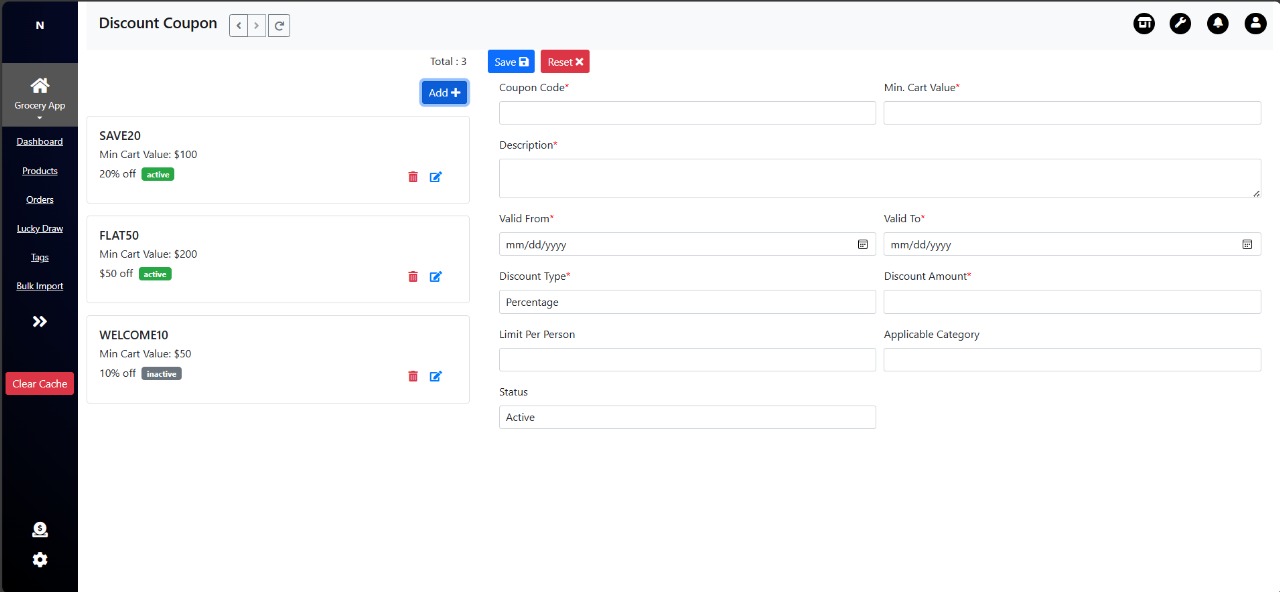
Create / Edit Coupon
To create a new coupon, Go to Navigator-> Discount Coupon ->click the Add + button. Existing coupons can be edited using the edit icon.
Coupon Fields
| # | Field Name | Description | Mandatory |
|---|---|---|---|
| 1 | Coupon Code | Unique code entered by customers at checkout (e.g., SAVE20, FLAT50) | Yes |
| 2 | Description | Short explanation of the discount offer (Get 20% off on orders above ₹1000) | Yes |
| 3 | Minimum Cart Value | Minimum cart subtotal required to apply the coupon (excluding delivery charges) | Yes |
| 4 | Valid From | Start date from which the coupon is active | Yes |
| 5 | Valid To | Expiry date of the coupon | Yes |
| 6 | Discount Type | Type of discount to apply (Percentage / Flat Amount) | Yes |
| 7 | Discount Amount | Value of the discount based on selected discount type | Yes |
| 8 | Limit Per Person | Maximum number of times a single customer can use the coupon | No |
| 9 | Applicable Category | Categories to which the coupon applies; applies to all if empty | No |
| 10 | Status | Defines whether the coupon is Active or Inactive | Yes |
All created coupons are displayed in a list view with the following details:
- Coupon Code (e.g., SAVE20, FLAT50, WELCOME10)
- Minimum Cart Value
- Discount Value (percentage or flat amount)
- Status (Active / Inactive)
Coupon Application Rules
- Coupon is applied only if the cart subtotal meets the minimum cart value.
- Coupon must be active and within the valid date range.
- Usage should not exceed the limit per person, if defined.
- If applicable categories are defined, the coupon applies only to those products.