Instagram Automation
Overview
The Instagram Enquiry Automation feature in SalesSensi AI helps business owners automatically handle customer enquiries on Instagram — from comments, DMs, and even story replies. It replies instantly based on your uploaded product details and Q&A document, ensuring that customers receive quick and accurate answers even when you’re offline.
How It Works
DMs
Story Replies
Comments
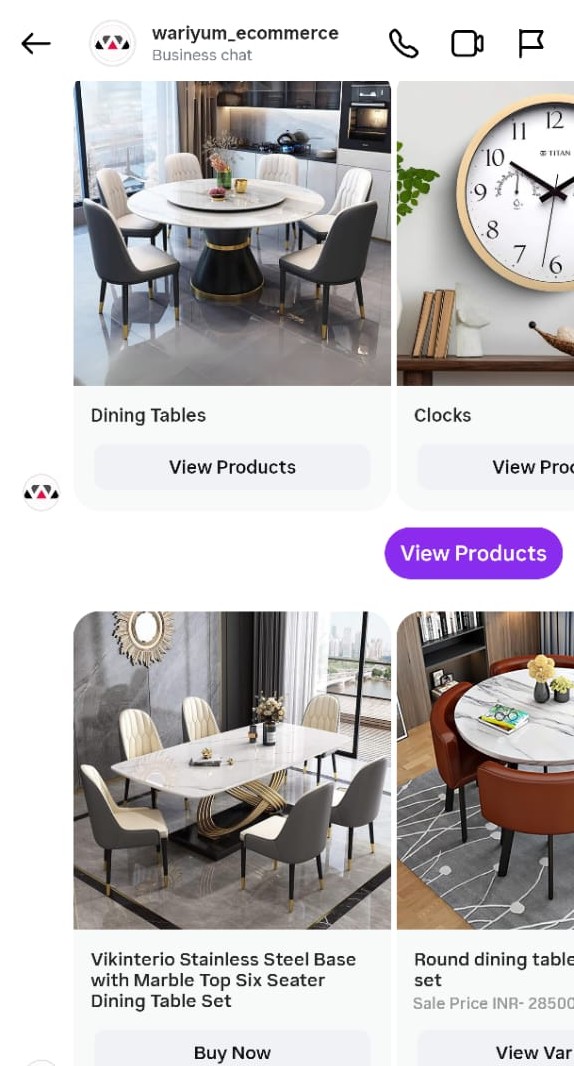
- A customer comments on your post, replies to a story, or sends a DM.
- SalesSensi AI checks your uploaded product details and Q&A document for matching information.
- If a match is found, it sends an instant, personalized reply.
- If the enquiry doesn’t match any stored answer,AI will remain silent and not send any reply, ensuring it never responds inaccurately or unnecessarily.
- If the customer asks for alternatives, a carousel of similar products or categories is displayed with CTAs such as “View products” or “Buy Now.”
- Up to 10 Products or Categories can be shown in a single carousel.
- When a customer clicks Buy Now, SalesSensi collects their delivery address (if new customer) and places the order automatically.
- For products with variants, a variant selection carousel appears before the order step
- For unsupported inputs like voice or images, the AI skips replying so admins can manually review.
Multi-Language Support (Alpha Phase)
SalesSensi AI supports customer queries in multiple languages:
- English – Full support for standard English queries
- Malayalam – Native Malayalam language support
- Manglish – Malayalam written in English script (e.g., "25000 rangeil sofa indo")
The system automatically detects the language of incoming messages, translates non-English queries to English for processing, and maintains context and intent accuracy across all languages. This translation happens seamlessly in the background without customer awareness, ensuring customers can communicate in their preferred language while receiving accurate, relevant responses.
What You Need to Provide
To make SalesSensi AI respond accurately and automatically on Instagram, you’ll need to set up your products, categories, and Q&A document inside Navigator.
1. Product Details
Add all your products in Navigator → Products. SalesSensi AI will automatically use product data such as name, price, variants, stock status, and description to answer customer enquiries.
| Field | Description | Example |
|---|---|---|
| Product Name | Name of the product | Red Dress |
| Price | Selling price | ₹799 |
| Size/Variants | Available options | S, M, L |
| Stock | Availability status | In stock |
| Description | Short product info | Cotton dress with floral design |
The AI can then answer questions such as:
- “What’s the price of the red dress?”
- “Do you have size L?”
- “Is this available in blue?”
Important:
When adding product, fill in the Search Suggestion field with a unique Product ID (for example: watch2).
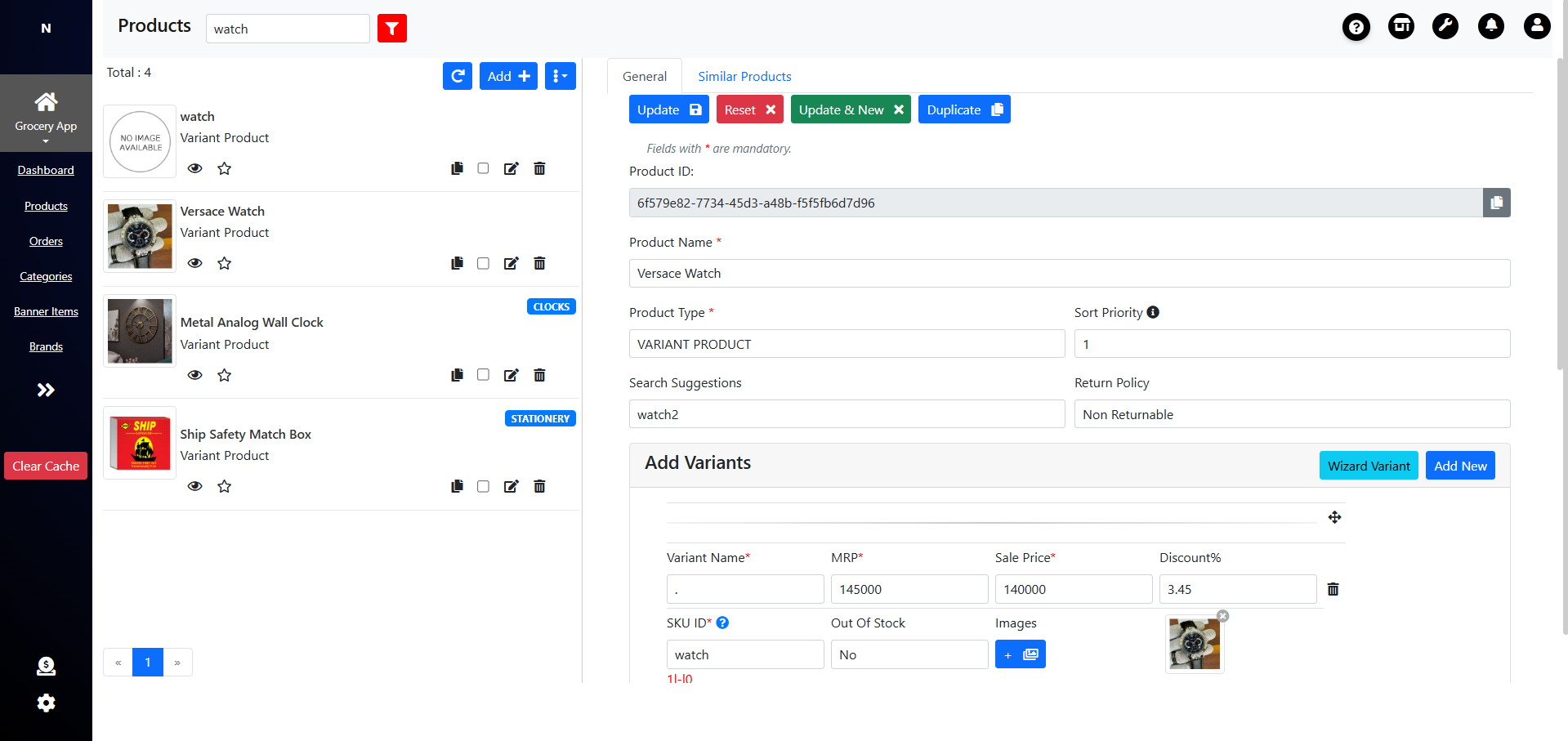 Include this same ID's in your Instagram post, reel, or story caption in the format below:
ID:watch2,bedroomset,watch3
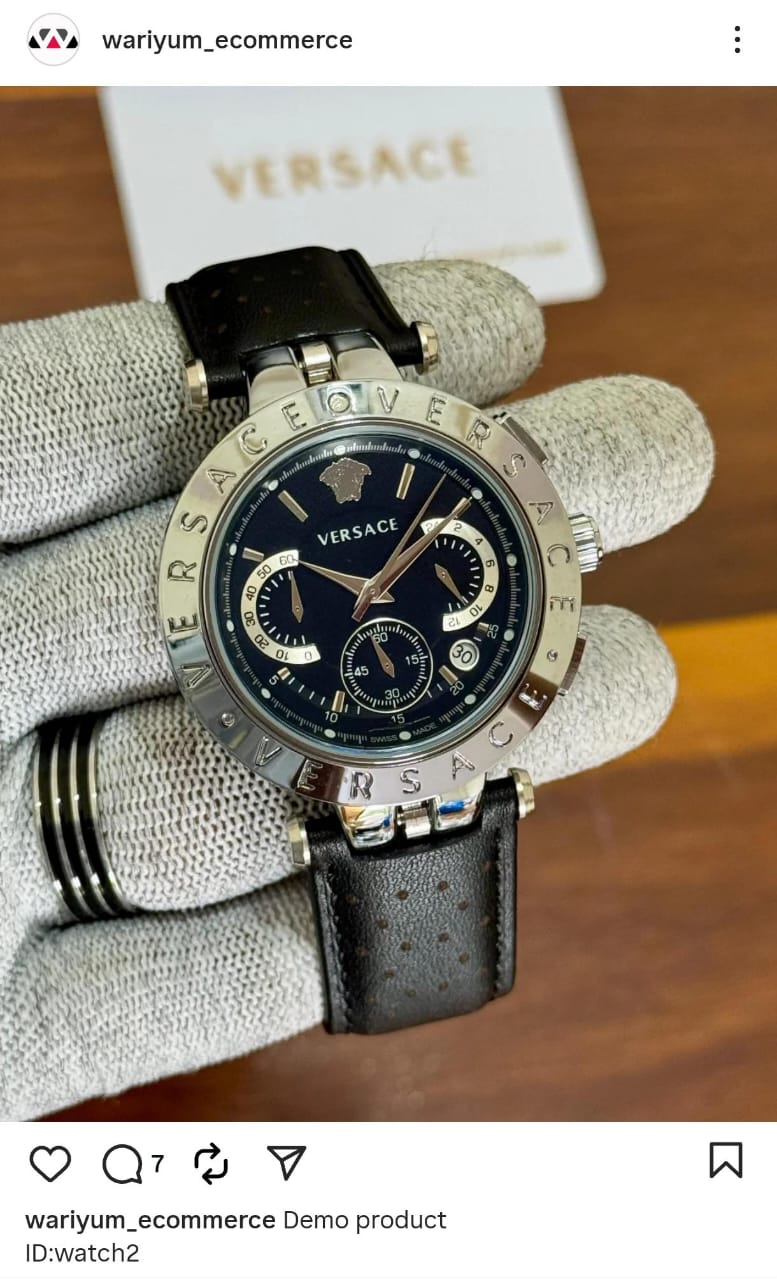
When a customer interacts with that post, SalesSensi AI will instantly recognize the products and respond with accurate details.
Smart Budget & Price Range Queries (Alpha Phase)
The AI intelligently handles budget-conscious queries and price range requests:
Budget Product Queries
When customers use terms like "low rates," "budget," "cheap," or similar, the AI identifies budget-friendly options in the requested category, displays products in a carousel sorted by price (lowest first), and filters out premium products.
Price Range Queries
When customers specify a price limit or range, the AI displays available products within that budget in a carousel format without requesting unnecessary information like address.
2. Enquiry Q&A Document
Add a list of frequently asked questions and their answers — mainly for general store-related enquiries. This helps the AI handle questions like delivery, payment, and returns.
| Question | Answer |
|---|---|
| What are your store timings? | We’re open from 9 AM to 9 PM every day. |
| Do you deliver to other cities? | Yes, we deliver across India. |
| What is your return policy? | Products can be returned within 7 days of delivery. |
If an enquiry doesn’t match any available product or Q&A data, the AI will remain silent and not send any reply, ensuring it never responds inaccurately or unnecessarily.
3. Category Management
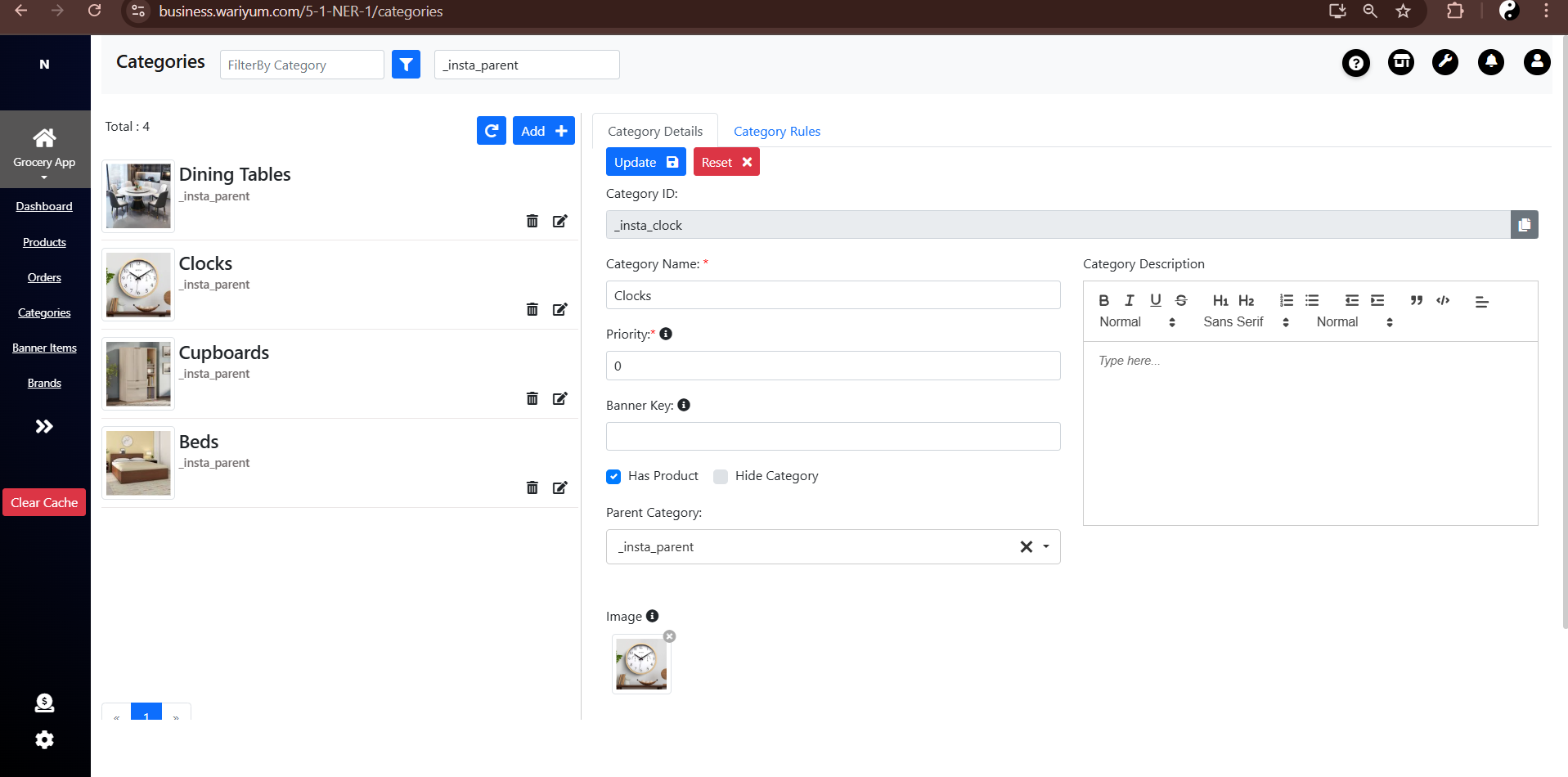
To enable SalesSensi AI to show carousels of similar or related products:
- Go to Navigator → Categories.
- Create a parent category named
_insta_parent. - Under
_insta_parent, create subcategories for each product type. - Map each product to its respective category.
| Category Name | Category ID | Example Products |
|---|---|---|
| Clock | _insta_clock | Wall Clock, Table Clock |
| Beds | _insta_beds | King size Beds |
When customers ask for related products — for example, “Show me more watches” — SalesSensi AI will use these mappings to display the correct product suggestions.
Of course — here’s your content rewritten in a clear, professional tone, formatted as two standalone sections you can directly include in your documentation:
Agent Mode
When a business admin replies manually to a customer on Instagram, Agent Mode is automatically disabled.
- The AI bot will pause for 1 hour for that particular customer, allowing the admin to take full control of the conversation.
- During this time, the AI will not send any automated replies.
- After the 1-hour window, automation resumes automatically without requiring any manual action.
This ensures seamless coordination between human responses and AI automation — maintaining a natural, professional flow in customer communication.
Follow-Up Insights & Summaries
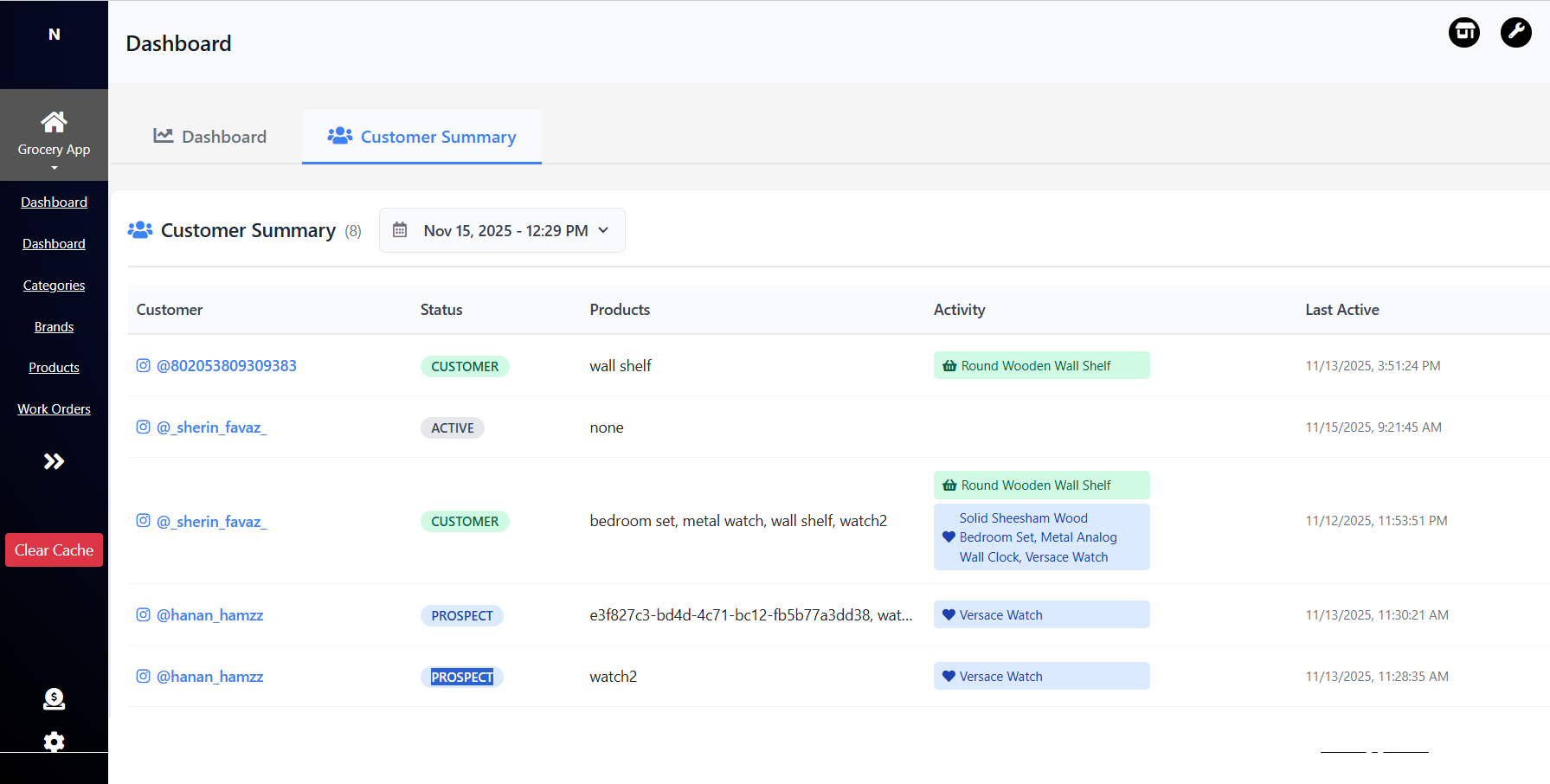
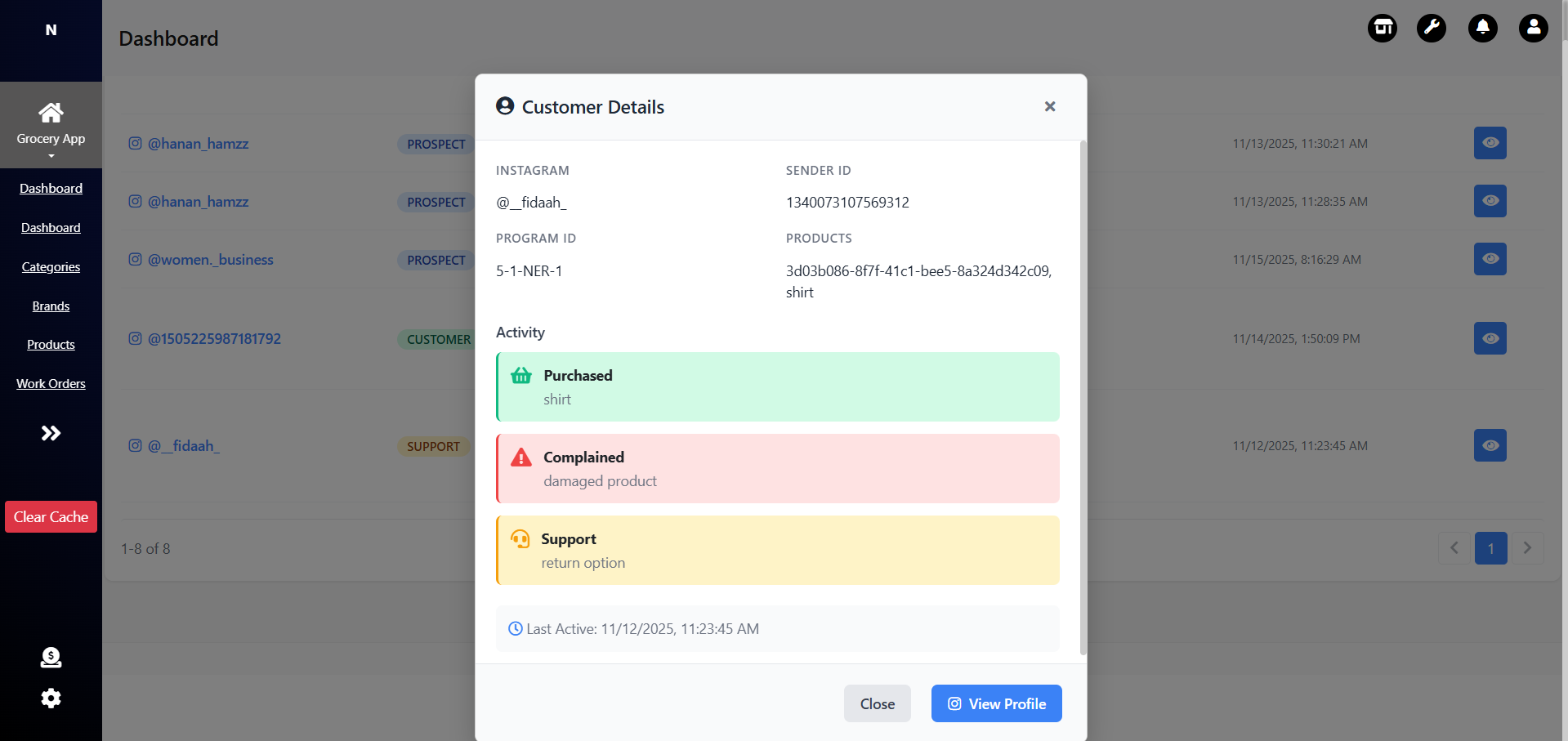 Every 12 hours, SalesSensi AI generates an internal summary report to help you manage customer engagement effectively.
The report categorizes customers based on their interaction patterns:
Every 12 hours, SalesSensi AI generates an internal summary report to help you manage customer engagement effectively.
The report categorizes customers based on their interaction patterns:
🟢 High Intent Customers – likely to buy soon
🟡 Needs Follow-Up – customers who showed interest but didn’t respond further
⚪ Casual Intent – customers who engaged casually without buying intent
These insights appear in Navigator, helping your team prioritize follow-ups, focus on hot leads, and improve conversion rates efficiently.
Rollout Plan
To ensure a smooth and stable experience, SalesSensi AI will be released in stages. This approach helps identify and resolve issues early, ensuring stable performance when fully launched.
Pilot Phase
- The AI bot will initially reply only for selected test users.
- This phase is focused on monitoring message accuracy, product mapping, and system stability.
- Once the admin confirms that the setup is performing as expected, the feature will move to the live stage.
Full launch
- After the admin verifies readiness, the feature will go live for all users.
- All businesses can then start using Instagram Automation for comments, DMs, and story replies seamlessly.
Benefits
- 24/7 Automated Enquiry Handling – Instantly responds to customer comments, DMs, and story replies, even outside business hours.
- Accurate, Data-Driven Replies – Uses your Navigator product and Q&A data to ensure every reply is correct and relevant.
- Zero Unnecessary Responses – If no matching data is found, the AI remains silent to maintain professionalism.
- Category-Based Product Suggestions – Automatically shows carousels of related or similar products when customers ask for more options.
- Seamless Order Flow – When customers confirm, the AI collects delivery details and places orders directly.
- Agent Mode for Manual Handling – When a business admin manually replies, the bot pauses for 1 hour to avoid overlapping responses.
- Insightful Summaries Every 12 Hours – Navigator receives summaries of:
- Customers needing follow-up
- Customers most likely to buy
- Customers showing casual intent
- Reduced Manual Workload – Automates routine questions, letting your team focus on high-value interactions.
- Consistent Brand Communication – Maintains a uniform and professional tone across all customer messages.
- Language Inclusivity (Alpha Phase) – Serve customers in their native language without barriers (English, Malayalam, Manglish).
- Budget-Aware Responses (Alpha Phase) – Show relevant products based on customer price preferences with intelligent filtering.
- Intent-Based Filtering (Alpha Phase) – AI understands context (browsing vs. buying) and responds accordingly, skipping unnecessary questions.
Example Conversations
Below are the conversation flows that SalesSensi follows in different customer scenarios.
New Customer
[Customer comments in a reel]
Customer: price
AI Agent: This is [Product Name], priced at ₹[Price]. Would you like to order it?

Customer: Yes / I want this
AI Agent: Great. Please share your delivery address.

Customer: [Shares address]
AI Agent: Thank you. Confirming — you want to order [Product Name] at ₹[Price], to be delivered to [Customer’s address snippet], correct?

Customer: Yes / Confirm
AI Agent: Perfect. Your order for [Product Name] has been placed successfully. You will receive the order details shortly.
Existing Customer
[Customer sends reel]
Customer: What’s the price of this?
AI Agent: This is [Product A Name], priced at ₹[Price A]. Would you like to order it?

[Customer sends another reel]
Customer: Price of this one?
AI Agent: That’s [Product B Name], priced at ₹[Price B]. Would you like to order this one?

[Customer replies to first reel]
Customer: I want this
AI Agent: Great! Just confirming — you mean [Product A Name] priced at ₹[Price A], right?

Customer: Yes / Confirm
AI Agent: Perfect. Should we deliver it to your existing address ending with [Address snippet]?

Customer: Yes
AI Agent: Awesome! Your order for [Product A Name] has been placed successfully. You’ll receive order details shortly.